Stop re-planning your day every morning.
Nexto auto-slots your tasks into Google Calendar by deadline, priority, and meetings. Built for solo devs and freelancers who would rather ship than plan. No more "when will I do this?" — your week is already decided.
Nexto is launching soon. Secure your spot now.
|Task Auto-Scheduled
Mon 9:00 AM - 10:00 AM
Why Nexto
Save Hours Every Week
Add a task, set a deadline and estimate. Nexto fits it around your calendar and meetings. Seconds per task, hours back every week. No more “when will I do this?” — the calendar is already decided.
Endless Lists and Decision Fatigue — Gone
Too many tabs, too many “next actions,” too much context-switching. Nexto turns the list into one thing: the next block on your calendar. No triage paralysis. Open the app, do the block.
No More “I Forgot About That”
Missed deadlines and last-minute scrambles happen when planning is manual. Nexto backfills from due dates and warns you in advance. Days of advance warning before overload hits. No surprises.
Stacked for “No” to Feel Stupid
Deadline-aware scheduling, priority-based slots, Google Calendar sync, drag-to-reschedule. One system: tasks, meetings, and focus time in one view. Built for solo devs and freelancers who hate planning.
See It In Action
A clean, intuitive interface designed to help you focus on what matters
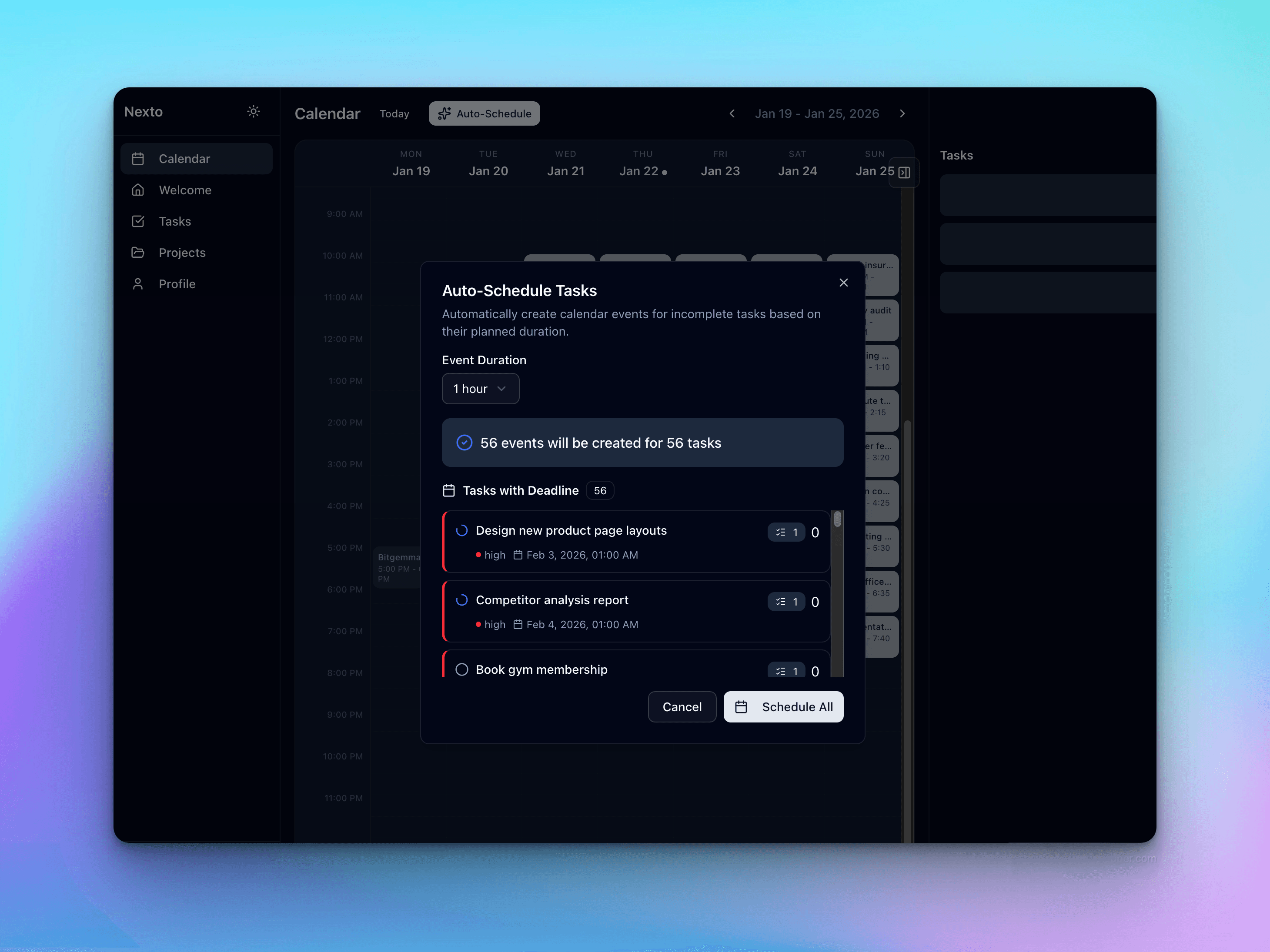
Smart Scheduling
Your week at a glance with intelligently auto-scheduled tasks that adapt to your calendar
Smart Scheduling
Your week at a glance with intelligently auto-scheduled tasks that adapt to your calendar
Automatic Scheduling That Actually Works
Built by devs who were tired of doing the planning work ourselves.
Deadline-Aware Scheduling
Schedules backward from due dates. Duration, priority, and availability in one pass. You never start too late — overload shows up days in advance.
Priority-Based Placement
High-priority work gets the best slots. The rest fills the gaps. Your energy goes where it matters.
Google Calendar Sync
Reads meetings and blocks. Schedules tasks around them. One source of truth — no double-entry, no collision.
Drag to Reschedule
Move a block; the rest adjusts. Or let the system reschedule when meetings move. Your plan stays realistic without you redrawing it.
Natural-Language Command Palette
Hit Cmd+K and type "Call doctor by tomorrow, 1 hour, high". Deadline, duration, and priority are highlighted inline as you type. Press Enter — task created, scheduled, done.
Siri & Mobile Quick Capture
Say "Hey Siri, Nexto" to dictate a task hands-free, or scan a QR code to open a mobile capture page — no login needed. Tasks land directly in your schedule.
What You Get Back
saved per week — focus on shipping, not planning
“what’s next?” — your calendar is the single queue
of advance warning before overload hits
How It Works
Three steps. One workable schedule. No ritual.
Add Your Tasks
Title, deadline, estimate, priority. Seconds each. No forms, no friction.
Connect Google Calendar
One-time sync. Nexto uses meetings and blocks so tasks land in real open time.
Open Calendar, Execute
Every task is time-blocked. Follow the plan. Reschedule by drag when life changes — or let it auto-reshuffle.
Frequently Asked Questions
How Nexto handles the scheduling problems people actually have.
How do I get an early warning when I have too much work due in a week?
Nexto schedules backward from due dates. If a deadline can’t fit around your meetings and other tasks, the task is flagged as a deadline violation the moment it becomes unrealistic — days in advance, not the night before. Overload shows up on your calendar as soon as it exists, so you can renegotiate scope or deadlines early instead of scrambling.
How can freelancers keep their schedule flexible for last-minute client requests without missing deadlines?
Add the new request with a deadline, duration, and priority — Nexto reshuffles everything else around it automatically, respecting all your other due dates. You can also drag any block to a new time and the rest of the plan adjusts. The schedule stays realistic without you replanning the week by hand.
I feel overwhelmed by decision fatigue looking at my backlog every morning. Does Nexto help?
Yes — that’s the core idea. Nexto turns your backlog into exactly one decision-free queue: the next block on your calendar. Sorting by deadline, priority, and task dependencies happens in the scheduling engine, not in your head. You open the app and do the block.
Does my daily plan account for my actual meeting schedule?
Yes. Nexto syncs with Google Calendar, reads your meetings and busy blocks, and only schedules tasks into real free time between them. When a new meeting lands or one moves, affected tasks are rescheduled automatically — no double-booking, one source of truth.
I always underestimate how long tasks take, which ruins my plan. How does Nexto handle that?
Tasks are scheduled in chunks, so a long task can split across available slots. When a task runs over, the unfinished remainder is rescheduled into the next open slot and the rest of the plan shifts automatically. A bad estimate costs you one block, not the whole week.
Do I need a weekly planning ritual to use Nexto?
No. Scheduling is continuous and event-driven: every time you add or change a task, move a meeting, or change your working hours, Nexto recomputes the plan in the background. There is nothing to review on Sunday night — the calendar is always current.
How does Nexto protect deep-focus time?
You define working-hours schedules for each day, and Nexto keeps buffers between blocks so the day isn’t wall-to-wall. High-priority work gets the best slots; everything else fills the gaps. Because tasks and meetings live in one view, your focus blocks are visible to you — and defensible.
Does Nexto have two-way Google Calendar sync that avoids double-booking?
Yes. Nexto reads your Google Calendar events and writes scheduled task blocks back, so both calendars agree. Overlapping events are merged before free slots are computed, which prevents phantom gaps and double-booked time.
Focus Mode Unlocked
Stop planning. Start doing. Try it free for 14 days.